Preventing IP blocking
When you use Clonable, traffic from your clones passes through our servers. Your hosting provider therefore sees many requests from the same IP address, even though they come from different visitors.
A firewall or Fail2ban may see this traffic as suspicious and block our servers. This can make your clones unreachable. It is therefore important that your hosting provider whitelists our IP addresses and sets up Clonable as a trusted proxy.
We try to filter out malicious traffic before it reaches your server. However, we cannot block everything without also blocking legitimate visitors. Your own server's security is therefore still needed. Traffic from demos and healthchecks already runs separately from traffic for your live clones.
Outgoing IP addresses
Below you can find the IP addresses Clonable uses to connect to your server.
| Server | IPv4 Address | IPv6 Address |
|---|---|---|
| clonable-ams-1 | 80.69.93.77 | 2a01:7c8:bb06:71::/64 |
| clonable-rtm-1 | 87.253.157.237 | 2a01:7c8:bb07:b4::/64 |
The list is also available at clonable.nl/ips.txt. Some hosting providers can import and update this list automatically. Ask your hosting provider to set this up if they support it.
Blocking individual malicious requests is fine and encouraged. Make sure our servers remain reachable: even a temporary IP ban can make your clones unavailable. Ask your hosting provider to adjust only the rules that block or overly restrict our shared IP addresses. Other firewall and WAF rules can remain active.
If you are unsure which security systems your website uses, your hosting provider or IT department can help you check this and whitelist our servers.
Using the visitor's real IP address
We include the visitor's IP address in the X-Real-IP and X-Forwarded-For headers. Your web server, application, or WAF can use this address to recognise visitors and apply limits per visitor. This prevents all visitors to your clones from being treated as one visitor.
Your hosting provider needs to configure which proxies can supply these headers. Do not accept them from just anyone: visitors can also send these headers themselves. X-Forwarded-For can contain several IP addresses, so the first address is not automatically the correct visitor IP.
If there is another CDN or load balancer between Clonable and your server, ask your hosting provider to include it in the trusted proxy configuration as well.
For more information, see Real IP address visitor. For NGINX, you can use ngx_http_realip_module, and for Apache, mod_remoteip.
Fail2ban and network firewalls
If you use Fail2ban, putting the correct visitor IP in your logs is only part of the setup. The connection to your server still comes from Clonable. A normal IP ban against the visitor in iptables or nftables therefore does not stop their traffic through Clonable.
Ask your hosting provider or administrator to set up the following:
- Exclude our outgoing IP addresses from automatic bans and remove any existing bans. In Fail2ban, this can be done using
ignoreipin the relevant jails. - Make sure logs and security rules use the correct visitor IP, based on the trusted proxy configuration.
- Block unwanted visitors through the web server, application, or WAF that can recognise this visitor IP. For Fail2ban, this also requires a suitable ban action.
- Check the connection and request limits for our IP addresses. These need to allow for the combined traffic of your clones.
Setting up Clonable as a trusted proxy lets your server use the visitor's IP address. Whitelisting our IP addresses prevents the firewall from blocking our servers. Ask your hosting provider to check both settings.
Checking that everything works
After setup, ask your hosting provider to check that:
- the correct visitor IP appears in the logs, and the connecting proxy's IP is still available for troubleshooting;
- a visitor cannot change their logged IP by sending their own forwarding header;
- a blocked test visitor can no longer access the clone, while another visitor still can;
- all required IPv4 addresses and IPv6 ranges are included, and no old bans remain active in other security systems.
If Clonable is blocked again, ask your hosting provider which firewall rule or Fail2ban jail caused it. Send us the domain, the time with time zone, the Clonable IP used, and the error code. If you also have a Clonable-Request-ID, include it so we can find the request more easily.
Finding a site's IP address
There are several ways to find your website's IP address. This page explains how to do this on Windows and Mac. You can also use an online tool such as NSlookup.io.
504 error
A 504 error means that an upstream server did not respond in time. This can be caused by an incorrect IP address or a block, but also by network problems or a slow or overloaded server. Start by checking the points below.
The IP address of the original site has changed
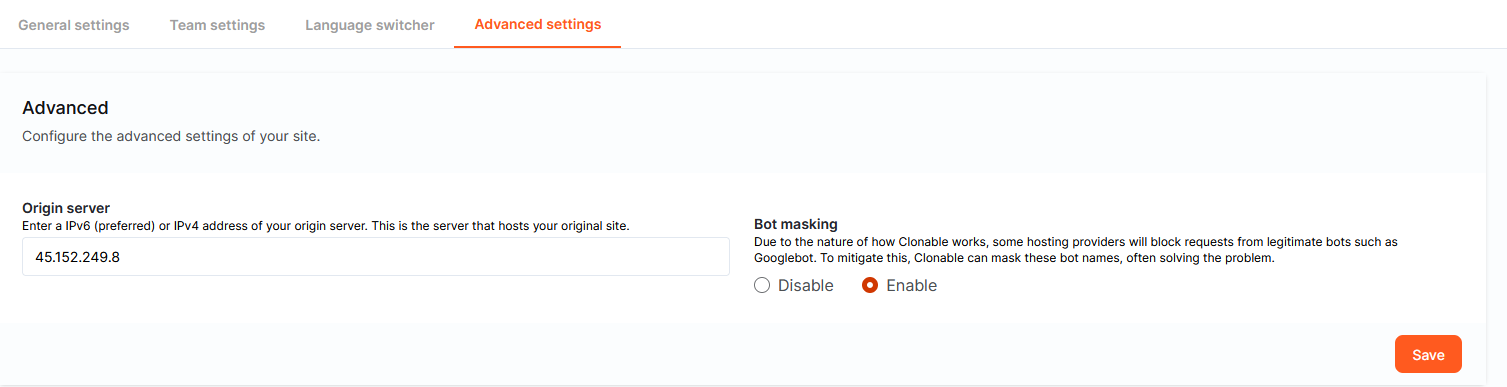
If the IP address of your original site has changed, the old address will no longer work. You can update it under origin server in the site settings under advanced.
Clonable is blocked
If the origin server is set correctly, ask your hosting provider to check the logs to see whether Clonable is being blocked. If so, the block needs to be removed. The settings above can help prevent this from happening again. You can also find the IP addresses in our IP list.
502, bad gateway
A 502 Bad Gateway error means that a valid response could not be retrieved from an upstream server. Check with your hosting provider that the IP address of your original server is correct. You can update it if needed under origin server in the site settings under advanced.
If the IP address is correct but the error keeps appearing, it may also be caused by connection, TLS, or origin server problems. Ask your hosting provider to check the logs and contact us so we can help investigate.