Shopware
To get the most out of Shopware, we highly recommend that you use our extension.
See our extension manual for more information.
How this extension works?
Before you start, please note that a Clonable subscription is required to use this extension.
With Clonable you can easily enter new markets by “cloning” your webshop for other languages. The idea behind this solution is that you only have to maintain one language and. When updating content in your default language, the translated versions of your webshop are automatically kept in sync by Clonable.
This extension only handles specific translation elements within Shopware:
- Product title
- Category name
- Product URL (slug)
- Category URL (slug)
Product and category URLs are automatically generated by Shopware based on the translated product titles and category names. All other translations are managed directly by Clonable.
Example
| Input Shopware | Default (German) | English in Shopware (before extension) | English in Shopware(after extension) | English frontend |
|---|---|---|---|---|
| Product title | Grüner Stuhl | Grüner Stuhl | Green Chair | Green Chair |
| Description | Dies ist ein grüner Stuhl | grüner Stuhl | Das ist ein grüner Stuhl | This is a green chair |
| Url (slug) | gruener-stuhl | gruener-stuhl | green-chair | green-chair |
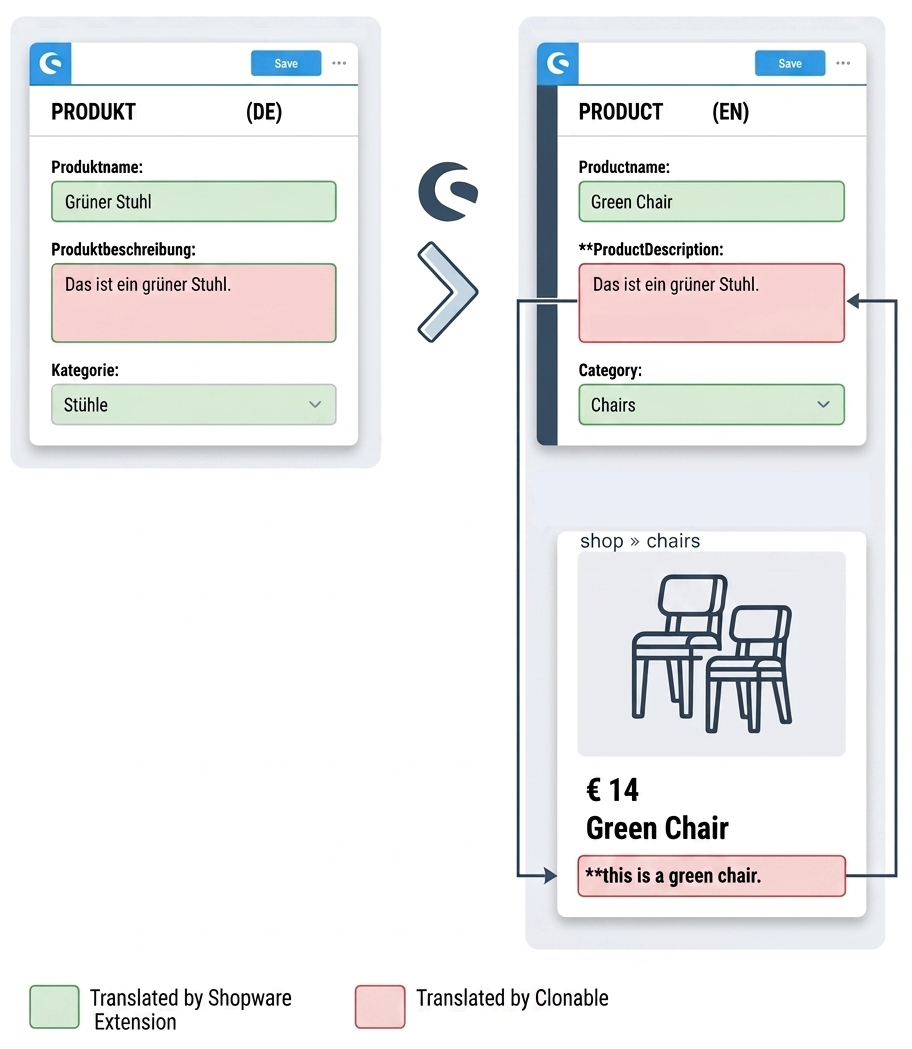
Where translations are stored
To ensure optimal performance and synchronization, most translations are stored on the Clonable servers. Except these elements, which are stored within Shopware:
- Product title
- Category name
- Product URL (slug)
- Category URL (slug)