Partner area
As a partner, you manage your customers, leads and commission from the Clonable dashboard. Select Dashboard in the left-hand menu to open the partner dashboard. It shows your partner details, your affiliate link and shortcuts to leads, your own Sites and support resources.
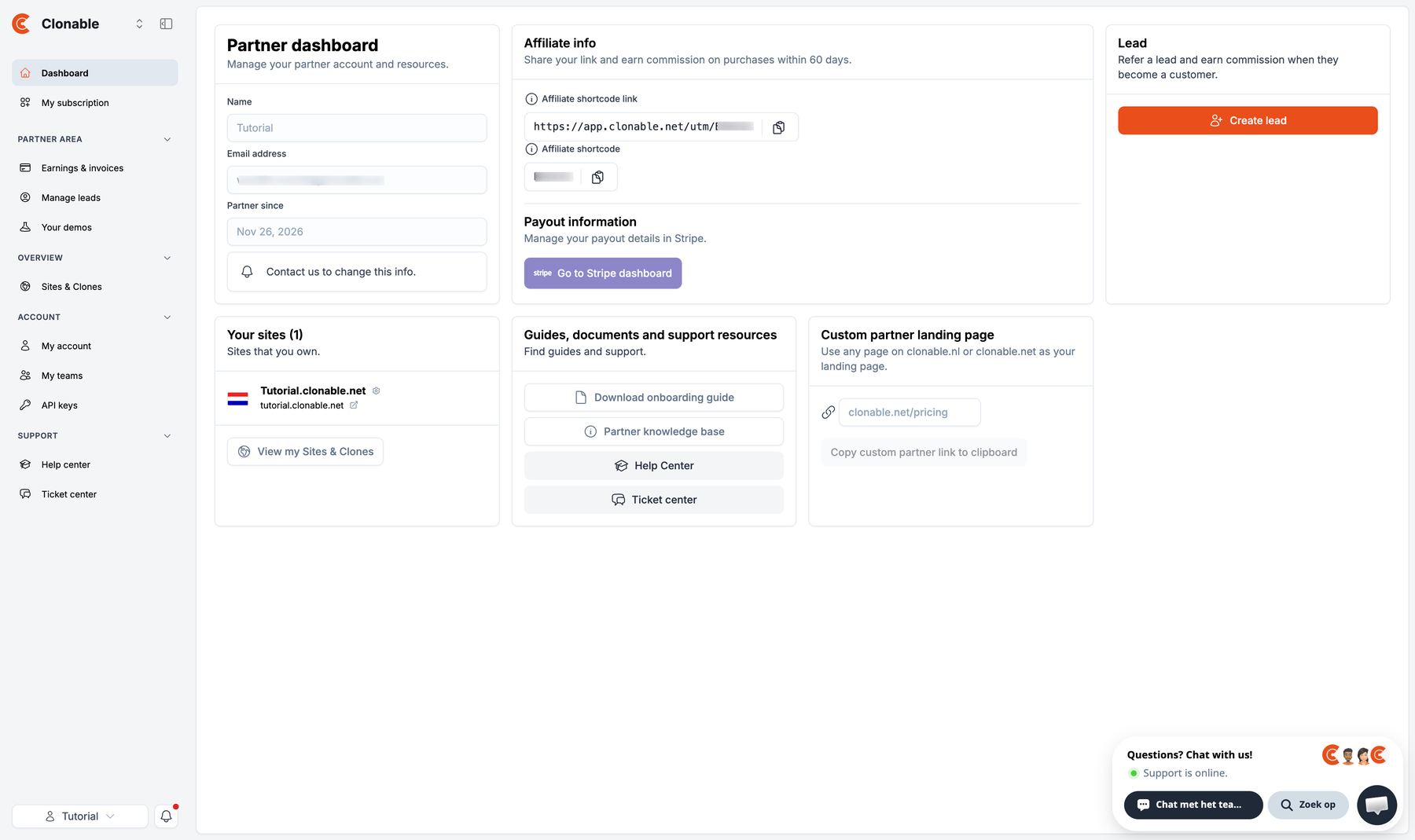
Use the blocks in the partner dashboard
| Block | What you can do |
|---|---|
| Partner dashboard | View your name, email address and the date you became a partner. To change these details, contact Clonable. |
| Affiliate info | Copy your affiliate link and affiliate shortcode. According to the dashboard, you earn commission on purchases within 60 days. See how to use your affiliate link. |
| Payout information | Select Go to Stripe dashboard to manage your payout details in Stripe. Read more about commission and payouts. |
| Lead | Select Create lead to register a prospective customer. See how to add and manage leads. |
| Your sites | View the Sites you own. Select View my Sites & Clones for the full overview. |
| Guides, documents and support resources | Download the onboarding guide with Download onboarding guide, or open the Partner knowledge base, Help Center or Ticket center. |
| Custom partner landing page | Enter a page on clonable.nl or clonable.net and select Copy custom partner link to clipboard to copy an affiliate link to that page. |
Open the sections in the left-hand menu
Under Partner area in the left-hand menu, you'll find the sections you use day to day:
| Section | What you can do |
|---|---|
| Earnings & invoices | View your commission and related financial documents. |
| Manage leads | Register prospective customers and track the status of your leads. |
| Partner profile | Complete your partner profile to appear on the Clonable partner page. |
| Your demos | Create and manage demos of prospective customers’ websites. |
Get started with a customer
Discuss which website the customer wants to translate, which languages they need and who will handle setup and ongoing management. Use the guide to help your customer get started, then choose how to connect the customer account.
You only earn commission for a customer who is connected to your partner account. Open Manage leads in the left-hand menu and check that your customer shows Pending in the Status column before your customer starts a paid subscription. Pending means the customer account is connected to your partner account.
Is the customer missing? Contact Clonable through the chat in the bottom-right corner of the dashboard or through Support > Ticket center. Ask your customer to wait with payment until Clonable has checked the connection. See how to connect a customer.
To work in the customer’s account, ask them to invite you as a team member.
To try Clonable on your own website, you get a free Business plan for your own site for one year as a partner. For definitions of the terms used in the partner area, see the glossary.